We use cookies to understand how visitors use this site. No ads, no cross-site tracking. See our Cookie Policy.


Restaurant Commerce Platform
Your Restaurant. Your POS.
Your Online Store. One Platform.
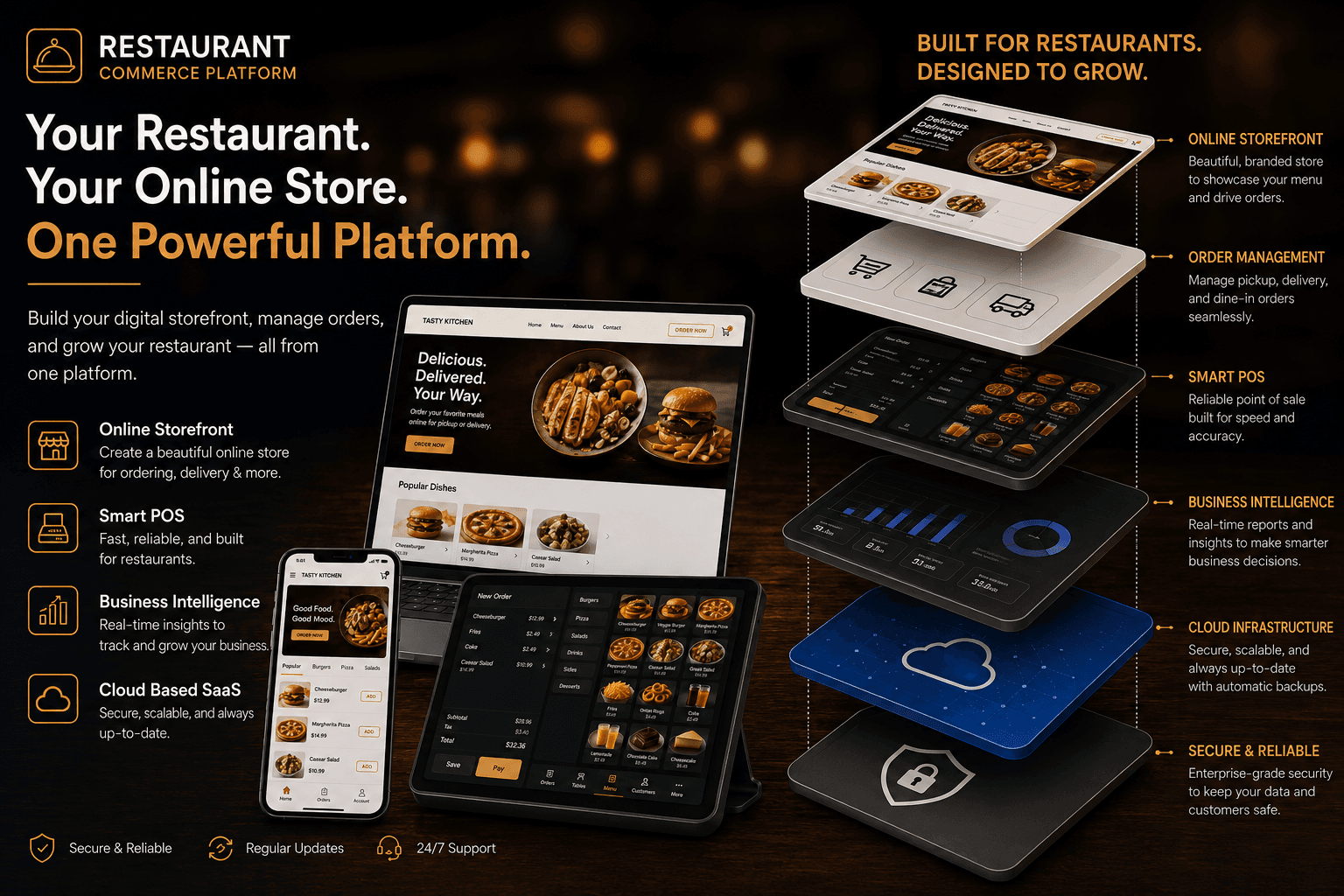
Build your digital storefront, manage orders, and grow your restaurant, all from one platform.

How orders move through the platform
Live tracking, the whole way
Storefront
A customer browses the menu
Checkout
Guest checkout, no account needed
Kitchen Operations
ConfirmedPreparingReady
Out for Delivery
On its way
Delivered
Reaches the customer
Walk-in / POS
Staff builds the order in POS
Payment
Paid without leaving the screen
Kitchen Operations
ConfirmedPreparingReady
Served
Food reaches the table
1 restaurant live
4 design presets
Live order tracking, no app required
What is Restaurant Commerce Platform?
Restaurant Commerce Platform is a multi-tenant SaaS platform that gives restaurants the tools to manage online ordering, digital storefronts, point of sale, and restaurant operations from one platform.
Each restaurant gets its own branded restaurant website and online ordering storefront, where customers can browse the menu and place orders for pickup, delivery, or other available order types. Restaurants can customize their storefront, manage menus, modifier groups, add-ons, and size-based pricing without having to build an online ordering system from scratch.
The platform includes a restaurant POS system that allows staff to manage dine-in and walk-in orders using a visual floor plan. A kitchen order management system helps staff track orders from the moment they are received through preparation and completion.
Customers can order as guests without creating an account or downloading an app. They can also track their restaurant orders in real time using their order number and phone number.
Restaurants can connect their own payment provider or continue accepting orders while collecting payment separately outside the platform.
The platform hosts any number of independent restaurants, each with its own branded storefront, menu, settings, and isolated business data. Nothing about one restaurant's setup affects another's.
Restaurant Commerce Platform provides restaurants with a complete online ordering system, digital storefront, restaurant POS, and order management solution in one SaaS platform.
Everything a restaurant's online presence needs
Not a page builder with a menu bolted on. A system built around how restaurants actually take and fulfill orders.
See the storefront and menu in detailPoint of Sale (POS)
A point of sale built around your floor plan
See every table at a glance, seat a walk-in without a reservation, and build an order from the same menu the storefront uses. Staff can add, edit, or remove menu items directly from the POS screen, so a change made mid-service applies to the storefront at the same time. Payment is taken and a receipt issued without leaving the order screen, and every order is sent straight to the kitchen the moment it's confirmed.
Explore the point of saleKitchen Operations
A live kitchen operations view
A live ticket queue shows new orders, preparation status, and elapsed time since arrival, with a single tap to advance each order to its next stage. Every ticket can be printed on demand, or set to print automatically. Every order the platform receives, whether placed online through the storefront or built at the POS, lands in the same ticket queue the moment it's confirmed, so kitchen staff never need a second screen to know what's coming. If a ticket fails to print, the platform retries automatically rather than silently losing it.
See the kitchen queue in detailOrder Tracking
Live order tracking, without an app
No account and no app download required. An order number and phone number are enough, with the page updating automatically as the kitchen advances the order, from confirmed through preparing to ready, and on to out for delivery or ready for pickup, so a customer always knows where things stand without having to call and ask.
Explore the storefrontOne platform, every restaurant its own
Every restaurant here gets its own branded storefront, menu, and team, completely separate from every other restaurant on the platform. Your design and menu are yours alone: each restaurant can pick its own design direction, colours, and typography rather than a shared template with a different logo swapped in, and its menu, orders, and team access are kept just as separate underneath, restaurant by restaurant.
Frequently Asked Questions
Do my customers need to create an account to order?
No. Checkout is guest checkout by default, for delivery, pickup, or dine-in, so customers can order without registering. An optional customer account system (order history, saved addresses, loyalty) sits alongside guest checkout, never required to place an order.
Does the platform process online payments?
Yes. Connect a Stripe account and customers can pay by card at checkout, the same familiar card-entry flow whether they're ordering as a guest or through an account. We deduct a platform fee per order, agreed individually with each restaurant rather than a fixed percentage, automatically at the point of payment, so there's no separate invoice to reconcile. The rest of each order's funds settles to your restaurant's own connected Stripe account after a short hold period and a manual platform review, not immediately: that review step exists specifically so a transfer only goes out once it's actually been checked, not on blind trust in an automated rule. Connecting Stripe is entirely optional. A restaurant that doesn't connect one can still take guest orders with payment collected outside the platform, cash on delivery, card on pickup, however you already handle it, exactly as before.
Can I run more than one restaurant on the platform?
Yes. One account can administer any number of independently branded restaurants, each gets its own storefront, menu, and team, and nothing about one restaurant's design or menu affects another's.
How much can I customize how my storefront looks?
You start from a design direction that suits your brand, then make it your own: colors, fonts, corner style, and how your hero section is presented (a photo, a slideshow, or a video).
How complex a menu can I build?
The menu builder supports categories, items, and modifier groups with required or optional selections, size and topping pricing, featured items, and dietary tags: the same editor whether you're running a two-item menu or a large multi-category one.
Book a Call
Prefer to talk it through first?
Pick a time that works for you. No form, no waiting for a follow-up email.
Choose a date and time that suits you. The live calendar opens right here.
Live Demo
See it running, no signup required
This is a real, independent storefront running live on the platform, not a screenshot or a mockup. Click through, browse the menu, and place a test order to see exactly what your own restaurant would get.
Already running a restaurant here?
Sign in to manage your menu, orders, and storefront design.
Log inNew restaurant? Ask your platform administrator to set up your account.

